
Checkout SDK
The Checkout SDK lets you embed sustainability options directly into the checkout flow, so consumers can see the environmental impact of their purchase and add a contribution before paying. Contributions happen as part of the original payment - no second transaction required.
Your server creates the checkout session and receives three values: sessionId, clientSecret and sessionData. Pass all three to the SDK, which works out the quote from the consumer's browser.
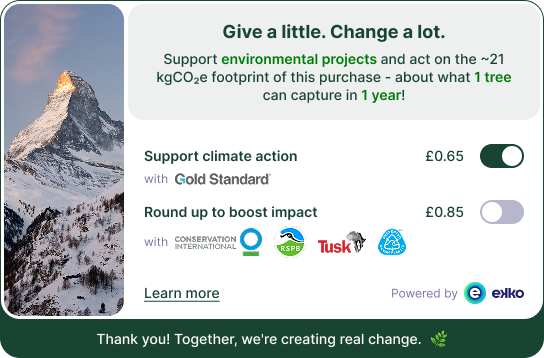
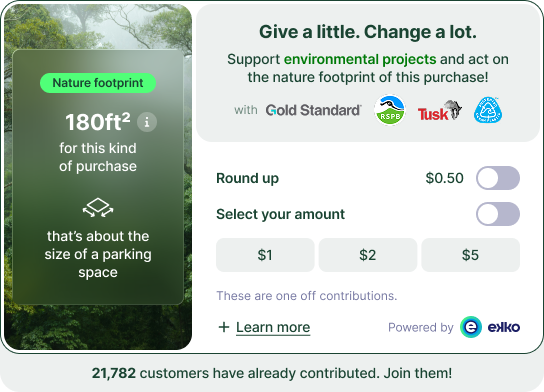
The SDK supports two impact types, carbon and nature. The session's impactType decides which one renders, and the same initCheckout call drives both. See Impact types below for what each experience shows.
Integration sequence
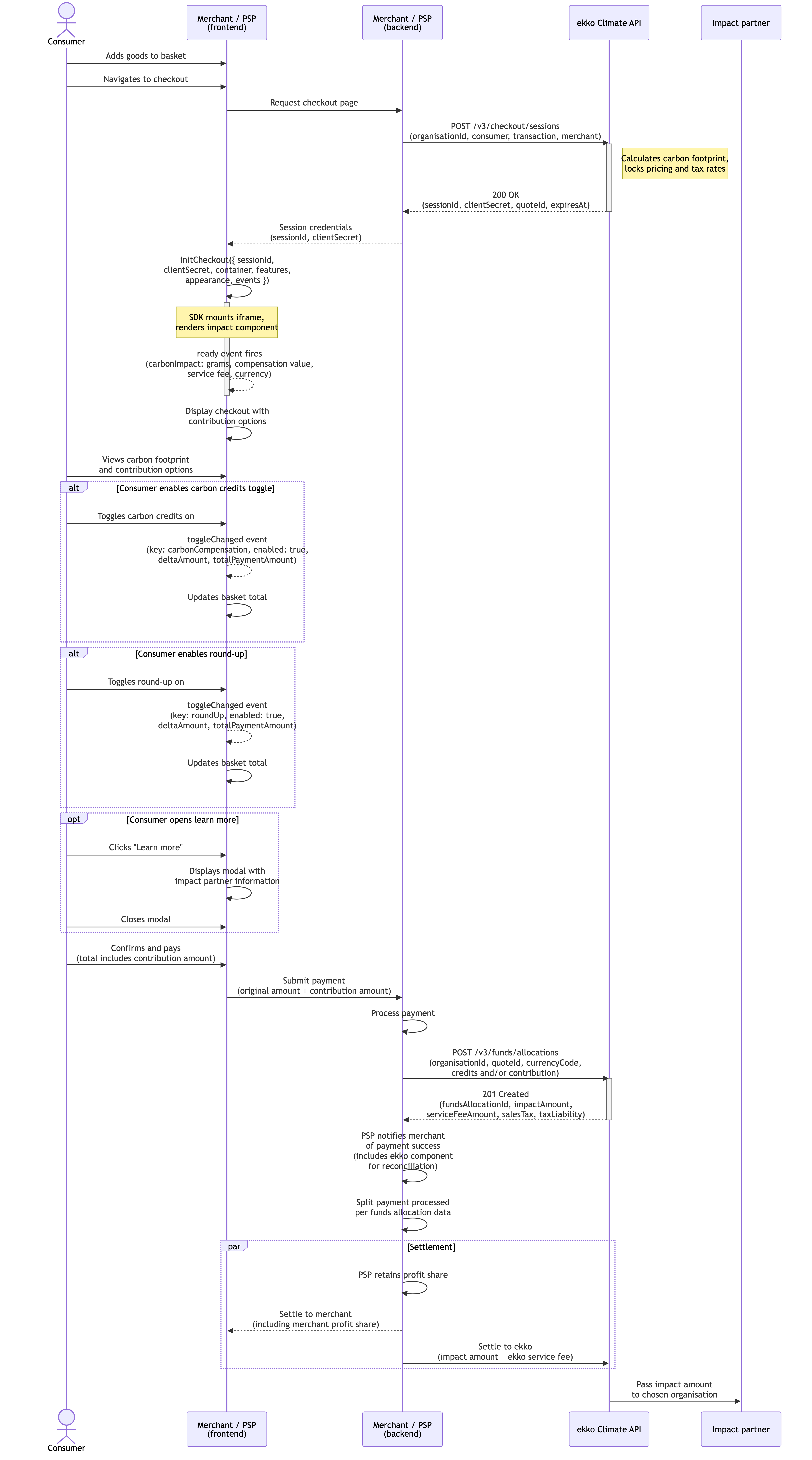
The diagram below shows the complete Checkout SDK flow, from the backend session request through to settlement.
Step-by-step flow
- Create an organisation. If your hierarchy requires it, create a child organisation using
POST /v3/organisations. See Create an organisation. - Create a checkout session. Call
POST /v3/checkout/sessionswith theorganisationId, consumer and transaction details. The response returnssessionId,clientSecretandsessionData. - Initialise the SDK. On your frontend, include the SDK and initialise it with
sessionId,clientSecretandsessionData, passed through unchanged, along with your container reference and configuration options. The SDK works out the quote from the consumer's browser. Based on your configuration and session data, ekko server-side renders the impact component and dynamic messaging. This lets us iterate content and visuals without you shipping new code. - Subscribe to SDK events and update the payment amount. The SDK emits events when the consumer toggles round-up and/or contribution options. Each event carries the
quoteId. Take it and update the payment total immediately so the main payment includes the consumer's choice. - Consumer completes payment. You process the main payment including any contribution amount added via the toggle.
- Record the contribution. After a successful payment, send the
quoteIdyou took from the SDK's events to your server with the order. Then callPOST /v3/funds/allocationswith thatquoteIdand the chosen amount to create the impact record and receive areference. - Reconciliation (and reversals if needed). Use
GET /v3/funds/allocations/impactfor reporting and audit. If the purchase is refunded or cancelled, callPOST /v3/funds/allocations/{id}/reversewith the originalreference.
Key features
- Contribution controls matched to the impact type: carbon credits and round-up toggles for carbon, round-up and fixed-value contribution toggles for nature
- Event-driven updates so payment totals can be adjusted in real time
- Customisable look and feel: text and background colours, fonts, images and corner radius can be adjusted to fit the look and feel of your page
- "Learn more" modal for consumer education and legal disclosures, always shown
- Error and load state handling with fallback so checkout is never blocked
Impact types
When the session's impactType is carbon, the checkout shows:
- a hero number for the carbon footprint in grams or ounces based on the consumer's locale, with an illustrative equivalent
- toggles for carbon credits and round-up contributions
- an optional reward bar
- a "Learn more" modal covering the impact partners involved
When the session's impactType is nature, the checkout shows:
- a hero number for the biodiversity footprint in Mean Species Abundance (MSA), shown in square metres or square feet based on the consumer's locale, with one illustrative equivalent
- a round-up toggle
- a fixed-value contribution toggle with set amounts (for example £1, £3, £5) and an optional "contribute more" control
- a "Learn more" link covering the methodology and the impact partners involved
For background on the metrics, see carbon footprint and nature footprint.
SDK events use the same names for both impact types (ready, toggleChanged, resize, error). To tell carbon from nature, read impactType, which is on ready and on both shapes of toggleChanged. Update your payment total from toggleChanged in the same way for both.
Customisation options
The screenshots below show where each of these options applies on the live checkout.
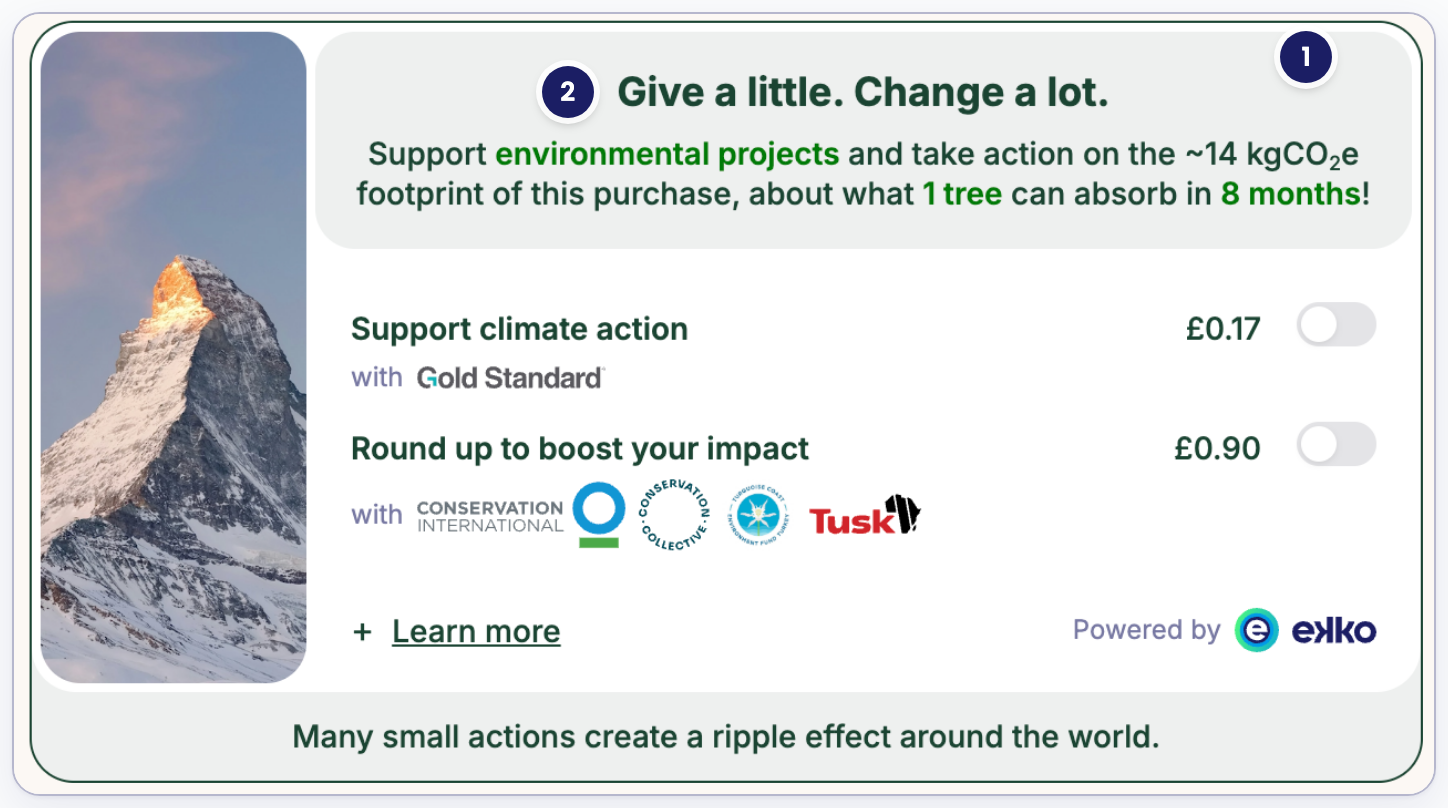
- Secondary colour: the light background behind the headline and summary text
- Highlight colour: the accent colour on key phrases and figures in the summary copy
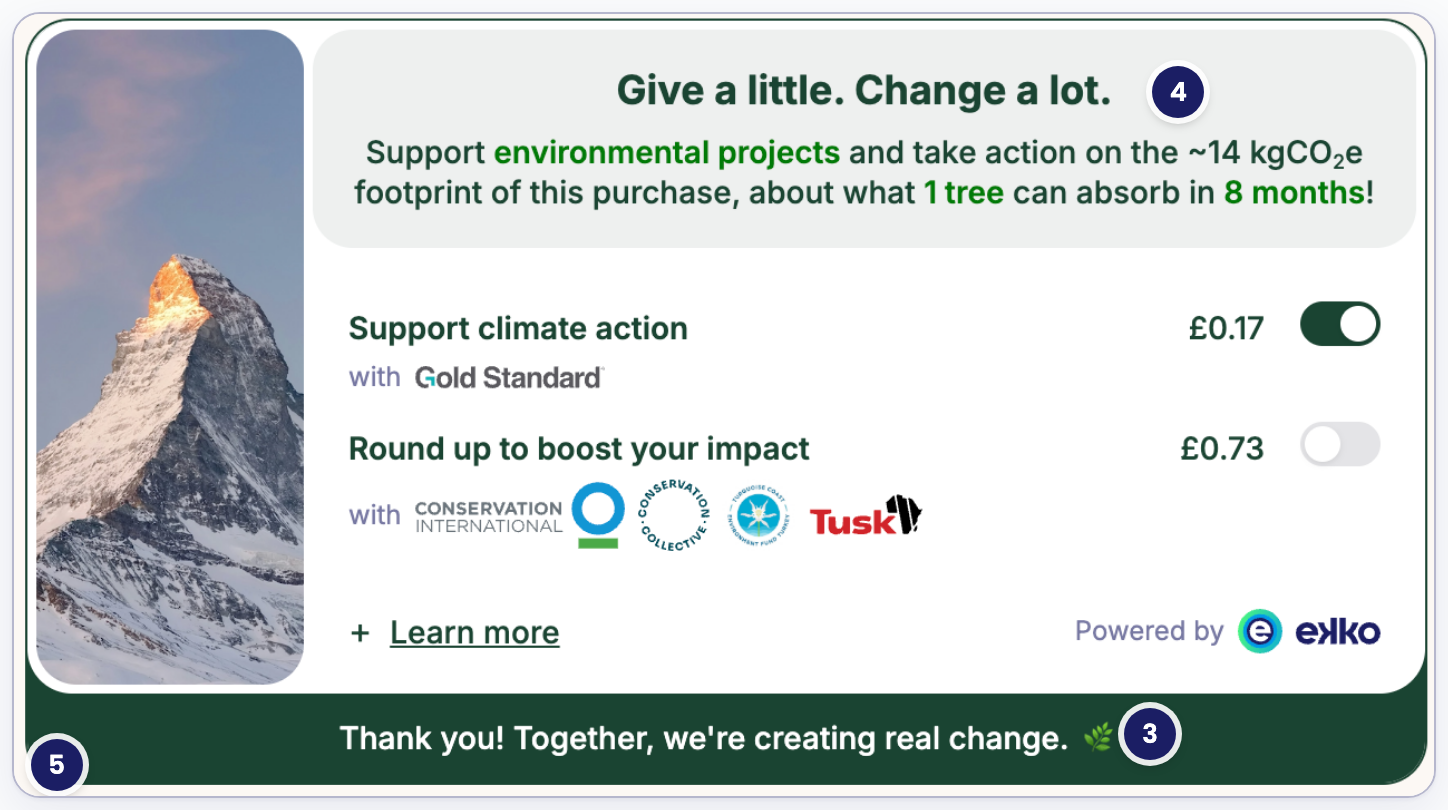
- Primary colour: the active toggle fill and the confirmation banner
- Text font: the typeface used across headline, body and toggle labels
- Corner radius: the rounding applied to the checkout's outer edge
The round-up toggle and reward bar rows apply to both impact types. The fixed-value contribution toggle row applies to nature sessions only.
| Customisation | Options | Default | Guidance |
|---|---|---|---|
| Round up toggle | true / false | true | Lets consumers round their payment to the nearest whole number, with the difference going to impact projects |
| Fixed-value contribution toggle | true / false | true | Lets consumers choose a set contribution amount (for example £1, £3, £5) on nature sessions, with an optional "contribute more" control |
| Reward bar | true / false | true | Positive reinforcement: it gives consumers a visible "well done" moment when they switch on carbon credits or round-up |
| Primary colour | your choice | ekko green: #1A4432 | Dark colour |
| Secondary colour | your choice | 8% of ekko green: #EDF0EF | Light colour; important to make sure the contrast ratio between primary and secondary is at least WCAG Grading AA |
| Highlight colour | your choice | #007A08 | Accent colour; contrast between this colour and the secondary colour needs to rate at least WCAG Grading AA |
| Text font | your choice | Inter (weights as per design) | Inter is a well-designed free font, chosen to clash as little as possible with most fonts applied to checkout screens. Alternatively, choose one of the supported font names, for example Inter, Roboto, Lato or Merriweather, or if you would like to use a proprietary font, contact [email protected] |
| Corner radius | your choice | follow radius of input fields up to 20px | Inside corners will follow outer corners - if outer radius is 20px, the inside radius will be 16px as the padding is fixed to 4px. |
| Image | elephant, mountain, waves, bird or waterfall | mountain | Match image with projects/organisations being supported |
Images for carbon impact version

Image options for the Checkout SDK
SDK architecture overview
The ekko Checkout SDK exposes a single public function and an instance interface:
initCheckout(options)→ mounts checkout into your container and returns an instance.CheckoutSDK→ the instance interface for lifecycle and event control.
Install with npm
npm install @ekko-earth/checkout-jsInitialise with npm
You can listen to SDK events in two ways: pass callbacks in on during initialisation, or subscribe after initialisation with checkout.on(...).
import { initCheckout, type CheckoutSDK } from '@ekko-earth/checkout-js'

const checkout: CheckoutSDK = initCheckout({
  container: '#ekko-checkout-container',
  sessionId: session.sessionId,
  clientSecret: session.clientSecret,
  sessionData: session.sessionData,
  mode: 'production',

  // Option A: subscribe during init
  on: {
    ready(e) {
      console.log('Checkout ready', e)
    },
    toggleChanged(e) {
      console.log('Toggle changed', e)
    }
  }
})

// Option B: subscribe after init
checkout.on('toggleChanged', (e) => {
  console.log('Post-init toggleChanged subscription', e)
})

checkout.destroy()
Install with a script tag
Load the SDK from the CDN if you are not using a bundler. The global variable is EkkoCheckout.
<div id="ekko-checkout-container"></div>
<script src="https://static.ekko.earth/v1/checkout/sdk/index.js"></script>
<script>

  const checkout = EkkoCheckout.initCheckout({
    container: '#ekko-checkout-container',
    sessionId: 'sess_123',
    clientSecret: 'cs_abc',
    sessionData: 'sd_xyz',
    mode: 'production',

    // Option A: subscribe during init
    on: {
      ready(e) {
        console.log('Checkout ready', e)
      },
      toggleChanged(e) {
        console.log('Toggle changed', e)
      }
    }
  })

  // Option B: subscribe after init
  checkout.on('toggleChanged', (e) => {
    console.log('Post-init toggleChanged subscription', e)
  })
</script>
Type reference
export type ImpactType = 'carbon' | 'nature'

// Event payloads
export type ReadyEvent = {
  sessionId: string
  quoteId: string
  impactType: ImpactType
  width: number
  height: number
}

export type ToggleChangedEvent = CarbonToggleChangedEvent | NatureToggleChangedEvent

type CarbonToggleChangedEvent = {
  impactType: 'carbon'
  quoteId: string
  key: 'carbonCredits' | 'roundUp'

  /** Determines if the toggle was enabled or disabled (i.e. true | false) */
  enabled: boolean

  /** ISO 4217 currency code for all amounts (e.g., 'GBP'). */
  currencyCode: string

  /** New total credits amount after the change */
  totalCreditsAmount: number

  /** New total payment amount after the change */
  totalRoundupAmount: number

  climateAction: { amounts: ToggleAmounts }
  roundUp: { amounts: ToggleAmounts }
}

type NatureToggleChangedEvent = {
  impactType: 'nature'
  quoteId: string
  key: 'fixedValue' | 'natureContribution'
  enabled: boolean
  currencyCode: string
  selectedAmount?: number
}

type ToggleAmounts = {
  total: number
  impact: number
  impactTax: number
  serviceFee: number
  serviceFeeTax: number
}

export type ResizeEvent = {
  height: number
  width: number
}

export type ErrorEvent = {
  code: string
  message: string
}

// Event callbacks
export type CheckoutEventCallbacks = {
  ready?: (e: ReadyEvent) => void
  error?: (e: ErrorEvent) => void
  toggleChanged?: (e: ToggleChangedEvent) => void
  resize?: (e: ResizeEvent) => void
}

// Init options
export interface InitCheckoutOptions {
  sessionId: string
  clientSecret: string
  sessionData: string
  container: HTMLElement | string
  mode: 'sandbox' | 'production'
  locale?: string
  strategy?: 'script-loader' // default: 'script-loader'

  features?: {
    roundUp?: boolean            // default: true
    rewardBar?: boolean          // default: true
  }

  appearance?: {
    image?: 'elephant' | 'mountain' | 'waves' | 'bird' | 'waterfall' // default: 'mountain'
    primaryColor?: string
    secondaryColor?: string
    highlightColor?: string
    textFont?: string
    outerBorderRadius?: number // px
  }

  on?: CheckoutEventCallbacks
}

// Instance
export interface CheckoutSDK {
  on(eventName: 'ready' | 'error' | 'toggleChanged' | 'resize', handler: Function): void

  // Lifecycle
  destroy(): void
}
Error codes: the error event can carry SESSION_NOT_FOUND, SESSION_EXPIRED, INVALID_CLIENT_SECRET, NETWORK_ERROR and API_ERROR, plus mount_error when the component could not be loaded at all.
Key inputs
Required
sessionId. The identifier for the Checkout Session you created via the Checkout Sessions API. Ties the SDK instance to a specific checkout flow.clientSecret. A secure token returned with the Checkout Session. Used by the SDK to authenticate the session.sessionData. The session's sealed inputs, from the create response. Pass it through unchanged.container. The DOM element (or a CSS selector) where the SDK mounts the checkout UI. Checkout expands to 100% of this container's size.mode. The environment the SDK should use for rendering. Always set this explicitly tosandboxorproduction.
Optional
locale. Language/region in BCP 47 format, e.g. en-GB, en-US, fr-FR. Set at SDK init, it takes precedence over the session'slocalefor the component's translations, price formatting and text direction. It does not trigger a new quote, so the session'slocalestill sets the language of the quote payload the API returns.features. Toggle specific checkout behaviours.roundUp: boolean (default true): enables or disables "round up" toggle.rewardBar: boolean (default true): controls visibility of the reward progress bar.
appearance. Controls visual style and branding.image: 'elephant' | 'mountain' | 'waves' | 'bird' | 'waterfall' (default mountain): image used in UIprimaryColor: brand's primary accent colour (hex or CSS colour).secondaryColor: secondary/ accent colour.highlightColor: used for highlights or interactive states.textFont: font family name applied to checkout text.outerBorderRadius: number, corner radius for cards/containers, in pixels.
on?: CheckoutEventCallbacks. Callbacks for SDK to client notifications during initialisation.ready(e: ReadyEvent): fired once checkout is initialised and the quote is available. Payload includes the session ID, the quote ID, the impact type and the rendered size.error(e: ErrorEvent): fired if checkout fails to initialise or a runtime error occurs. Payload includes a code and message.toggleChanged(e: ToggleChangedEvent): fired when a consumer changes a toggle (carbon credits or round up) or picks a nature contribution amount. Payload includes the quote ID, the impact type, the toggle key, its new state and the updated amounts.resize(e: ResizeEvent): fired whenever the size of the component changes. Use it to set the container height exactly to the rendered checkout.
strategy. How the component is embedded. Defaults toscript-loader.
CheckoutSDK (returned by initCheckout)
initCheckout)on(eventName, handler): void. Subscribes to an SDK event after initialisation.destroy(): void. Tears down the checkout instance and cleans up all event listeners. Use when unmounting or navigating away.
Behaviour and requirements
- Sizing → Checkout SDK has a
resizeevent which communicates the size of the container. You can then set the container's dimensions (width/height, min/max if needed), and checkout will render within those constraints. - Default behaviour → When initialised, checkout loads into the given container and manages its own content, interactions and internal navigation without additional setup.
- Responsive → The checkout experience adapts to different screen sizes (mobile, tablet, desktop) out of the box. No extra configuration is required.
- Container requirements → Must be present in the DOM and visible when you call
initCheckout.
Best practices
- Create sessions server-side and pass the
sessionId,clientSecretandsessionDatato the frontend unchanged. Never log the secret or include it in URLs. - Treat the SDK as the UI/editor of state; your system remains the source of truth for amounts and charge/capture.
- Subscribe using
onduring initialisation orcheckout.on(...)after initialisation to update totals in real time and persist toggle state for a smooth UX. - At order completion, allocate using the
quoteIdtaken from the SDK's events. - CSP & network: allow the ekko checkout app and CDN domains, plus any fonts/images used by appearance.
Security
Content Security Policy (CSP)
The component runs inside your own checkout page and calls the ekko Climate API from there, so your host page CSP needs to allow both the SDK's assets and its API calls:
script-srcandimg-src, production:https://static.ekko.earthscript-srcandimg-src, sandbox:https://staging.static.ekko.earthconnect-src, production:https://api.ekko.earthconnect-src, sandbox:https://staging.api.ekko.earth
Content-Security-Policy: default-src 'self'; script-src 'self' https://static.ekko.earth https://staging.static.ekko.earth; connect-src 'self' https://api.ekko.earth https://staging.api.ekko.earth; img-src 'self' https://static.ekko.earth https://staging.static.ekko.earth;If appearance.textFont is set to one of the supported Google Fonts, style-src and font-src also need https://fonts.googleapis.com and https://fonts.gstatic.com.
connect-srcmattersA policy that allows only the CDN blocks the quote and the component does not render.
Network allowlist (egress)
If your environment restricts outbound traffic from the host page/app, allow HTTPS (443) to:
static.ekko.earthstaging.static.ekko.earthapi.ekko.earthstaging.api.ekko.earth
Add fonts.googleapis.com and fonts.gstatic.com as well if you set appearance.textFont.
Updated 15 days ago