
Full page takeover SDK
This page reflects the current API behaviour. Some details may change as v3 is finalised.
The Full page takeover SDK runs as an intermediate step between payment and order confirmation. It creates a full-screen experience where consumers see the impact of their purchase and can choose to contribute further via ekko's hosted payment flow.
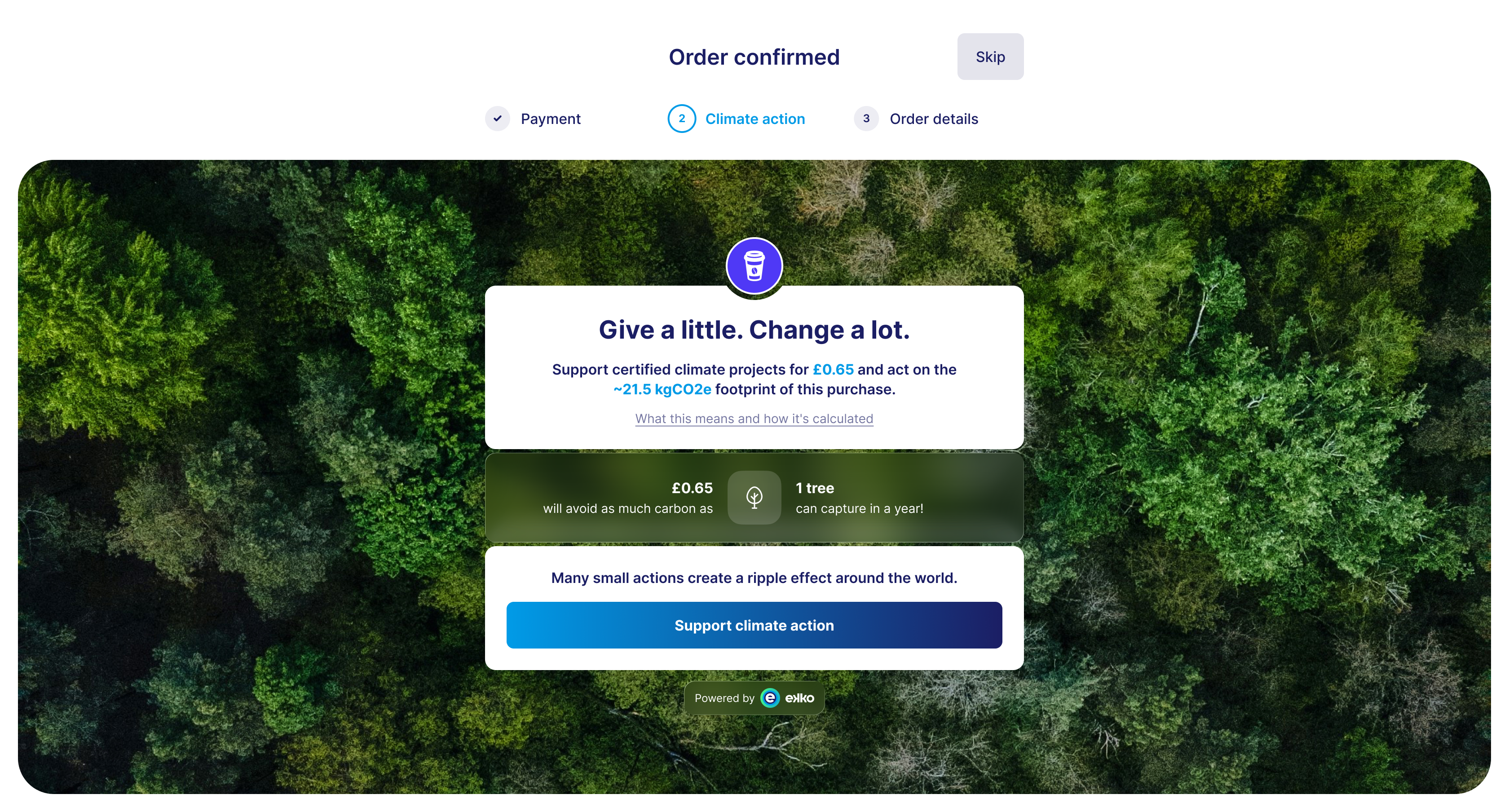
Step-by-step flow
-
Create an organisation. Use
POST /v3/organisationsto create an organisation. See Create an organisation for details. -
Create a post-purchase session. Call
POST /v3/post-purchase/sessionsfrom your backend withsdkVariantset totakeover, along with organisation, consumer, transaction and merchant details. You'll receive asessionIdand a short-livedclientSecret. See Create a post-purchase SDK session for the full request and response. -
Initialise the SDK. On the client, use the
clientSecretto authenticate the session. ekko server-side renders the takeover component. -
Consumer reviews and contributes. The takeover appears after payment and before order confirmation. Consumers see their footprint, project details, and can contribute using ekko's hosted payment page.
-
Set up webhooks. Subscribe to webhook events to stay in sync:
IMPACT_PAYMENT→ fired when a contribution is processedIMPACT_PAYMENT_REVERSAL→ fired if a payment is refunded or voided
-
Records and reconciliation. Contributions and reversals appear in your reconciliation records.
SDK architecture overview
The ekko Web SDK exposes two main classes:
- Ekko → entry point of the SDK. Initialise with the environment (
sandboxorprod) and optional settings likelocale - EkkoElements → used to create and mount ekko components. For ImpactPay, this provides the
createImpactPayPageTakeovermethod
Example initialisation
import { Ekko } from '@ekko-earth/ekko-js'

const ekkoInstance = new Ekko('sandbox', { locale: 'en-GB' })

const elements = ekkoInstance.elements({ clientSecret: 'your-client-secret' })

const impactPayElement = elements.createImpactPayPageTakeover({
  container: document.getElementById('impactpay-page'),
  impactPaySessionId: 'ips_12345',
  redirectUrl: 'https://your-confirmation-page.com'
})
Key inputs
impactPaySessionId(string, required) → returned from the ImpactPay Sessions APIredirectUrl(string, required) → where to send the consumer after completion or if an error occurscontainer(HTMLElement, required) → the DOM element where the takeover is injected and rendered
Behaviour and requirements
- Sizing → designed to occupy the full screen on desktop and mobile
- Default behaviour → renders as a full-page overlay and inherits 100% width and height from the container
- Responsive → scales automatically across devices without extra configuration
- Container requirements → ensure the container fills the viewport:
#impactpay-page {
  position: relative;
  width: 100vw;
  height: 100vh;
  overflow: hidden;
}
Integration examples
HTML
<!DOCTYPE html>
<html lang="en">
<head>
  <meta charset="UTF-8" />
  <title>Ekko ImpactPay Page Test</title>
</head>
<body>
  <div id="impactpay-page"></div>
  <script type="module">
    import { Ekko } from './node_modules/@ekko-earth/ekko-js/dist/ekko-js.esm.js'

    const ekkoInstance = new Ekko('sandbox')

    const elements = ekkoInstance.elements({ clientSecret: 'clientSecret' })

    const impactPayElement = elements.createImpactPayPageTakeover({
      container: document.getElementById('impactpay-page'),
      impactPaySessionId: '{impactPaySessionId}',
      redirectUrl: 'your-confirmation-page-url'
    })
  </script>
</body>
</html>
React
import React, { useEffect, useRef } from 'react'
import { Ekko } from '@ekko-earth/ekko-js'

const ekkoInstance = new Ekko('sandbox')
const elements = ekkoInstance.elements({ clientSecret: '{clientSecret}' })

const ImpactPayPage = () => {
  const containerRef = useRef(null)

  useEffect(() => {
    if (containerRef.current) {
      elements.createImpactPayPageTakeover({
        container: containerRef.current,
        impactPaySessionId: '{impactPaySessionId}',
        redirectUrl: 'your-confirmation-page-url'
      })
    }
  }, [])

  return <div ref={containerRef}></div>
}

export default ImpactPayPage
Events
The SDK emits events so your application can react in real time. Subscribe to these events to update your systems or capture analytics.
- ekko:ready → fired when the ImpactPay component has rendered and is ready for interaction
- ekko:balance-impact-clicked → fired when the user clicks the "Support climate action" button.
- ekko:skipped → fired when the user clicks the "Skip" button.
- ekko:error → fired when the SDK encounters a critical error. Includes a structured payload with
codeandmessage
Detail/payload structure:
{
  "carbonImpact": {
    "grams": 5655,
    "ounces": 199,
    "compensation": {
      "compensationValue": 0.047,
      "serviceFee": 0,
      "currencyCode": "GBP"
    }
  }
}
{
"impactPaySessionId": "6ec4cc9e-9318-429d-9be4-612dfe47d84e",
"impactPayUrl": "https://staging.impactpay.ekko.earth//en-GB/carbon?referenceId=6ec4cc9e-9318..."
}
{
  "impactPaySessionId": "6ec4cc9e-9318-429d-9be4-612dfe47d84e",
  "impactPayUrl": "https://staging.impactpay.ekko.earth//en-GB/carbon?referenceId=6ec4cc9e-9318..."
}
{
  "code": "client_secret_expired",
  "message": "Client secret has expired"
}
Example event subscription
// Store the returned element
const impactPayElement = elements.createImpactPayPageTakeover({
    container: document.getElementById('impactpay-page'),
    impactPaySessionId: '${impactPaySessionId}',
    redirectUrl: '${callbackUrl}'
});

// Listen directly on the custom element (not the container)
impactPayElement.addEventListener('ekko:ready', (event) => {
  console.log('ekko element is interactive', event.detail);
});

impactPayElement.addEventListener('ekko:balance-impact-clicked', (event) => {
  console.log('Support climate action clicked:', event.detail);
});

impactPayElement.addEventListener('ekko:skipped', (event) => {
  console.log('Skipped to order confirmation:', event.detail);
});

impactPayElement.addEventListener('ekko:error', (event) => {
  console.error('error:', event.detail);
});Note: In TypeScript, the DOM addEventListener callback is typed to receive a generic Event, which doesn't have a detail property. To access the Custom Event's detail, you'll need to cast it to CustomEvent
Error handling
The SDK has built-in safeguards to ensure your confirmation flows are never blocked. Error events follow a standardised structure, so you can capture them in your own telemetry or monitoring systems.
Subscribe to the error event to capture errors. Our SDK automatically redirects to the provided redirectUrl in the event of an error.
Error codes
| Code | Message |
|---|---|
| sdk_error | An unexpected error occurred in the SDK |
| iframe_load_error | Failed to load the iframe |
| missing_client_secret | Client secret is missing |
| client_secret_expired | Client secret has expired |
| invalid_params | Missing or invalid parameters provided |
| internal_server_error | Internal server error |
Best practices
- Always create sessions server-side and only pass the
clientSecretto the frontend - Store the
sessionIdfrom the API response and your ownorderReferencefor reconciliation - Provide a clear path back to the confirmation page with
redirectUrl